You can now build, test and debug the serverless applications that are defined by AWS Serverless Application Model templates with the AWS SAM Command Line Interface. You can debug the Lambda function written in Go including written in Java, Node.js, and Python. AWS SAM CLI also allows you to use the sam local generate-event command to generate the sample even payloads for the 50+ events. AWS Serverless Application Model Command Line Interface is integrated with Delve that allows you to debug for the Go programming language. You can use the latest SAM CLI by installing the command: pip install aws-sam-cli.

Cloud.in Blogs delivers the latest news and updates about AWS managed services and Cloud computing.
Friday, 31 August 2018
AWS has announced that Amazon GuardDuty is now HIPAA Eligible
Amazon GuardDuty analyzes the data anomaly detection and machine learning to identify unauthorized and unusual activity like unauthorized access to the accounts, cryptocurrency mining and unusual infrastructure deployments. Amazon GuardDuty will then notify you possible malicious activity affecting the security of the AWS resources. Amazon Web Services had announced that Amazon GuardDuty now adds HIPAA eligibility service. AWS covers the business entities and the subject with the Health Insurance Portability and Accountability Act of 1996 so to use AWS Service securely. HIPAA eligibility is implemented in all the AWS Regions where Amazon GuardDuty is available.
Amazon Elastic Container Service for Kubernetes now adds support for Horizontal Pod Autoscaling
You can now easily scale the kubernetes workloads that are managed by the Amazon Elastic Container Service for Kubernetes in response to the customer metrics with the latest support. Amazon EKS adds support for Horizontal Pod AutoScaler and Kubernetes Metrics Server. Earlier the Horizontal Pod Autoscaler was not supported by the EKS such as Kubernetes Metrics Server. This was because the Kubernetes Metrics Server would not start if the core Kubernetes API server was not utilizing the Client Certificate Authentication. EKS only uses the webhook authentication to offer integration with the AWS Identity and Access Management. But EKS supports AWS IAM and webhook authentication. So, in fact, this made it possible to use the Kubernetes Metrics Server and the Horizontal Pod Autoscaling. The customer can now scale the Kubernetes services easily based on the metrics that they define.
Thursday, 30 August 2018
Amazon Polly now adds support for the Hindi Language

Amazon Web Service has announced that they have added support for Hindi and Indian English Language to its Text-to-Speech Amazon Polly service in addition to the English language which will be the first bilingual voice. Amazon Polly brings life to the text by adding Lifelike speech via machine learning service. You can create application or products that can talk or is speech-enabled. It uses advanced deep learning technologies to produce speech that sounds like a human.
Amazon Polly offers dozens of lifelike voices in different languages and you can choose your desired voice or language to build speech-enabled application or products across the world.
Amazon has taken this step because of the mass number of Hindi speaking people residing worldwide. With this support, Amazon Polly Hindi Language Support can reach 500 million Hindi speaking people globally.
Amazon Polly uses Advanced deep learning technologies that can deliver human-like voice to the customers with a variety of language and voice to choose from. Customers can enable their application to talk with a natural sounding female and male voice. Adding speech-enabled features to their applications and products will provide the users a better way to connect with the customers. Adding voice to the text will make the user interface with the application and product more advanced.
Navdeep Manaktala, Head of Business Development at Amazon Internet Services Private Limited said that there is a huge demand for the content to be available in Indian English and Hindi language globally. Customers want their training videos, corporate narrations, E-learning, voice bots and more to be available in the Hindi language as well. With Amazon Polly, the users can easily switch between the voices and languages. He added that the customer requested for a high-quality speech in Hindi and India English language especially when the two languages are mixed and spoken together. Customers can also use local dialects including the Romanized Hindi, Devanagiri Hindi and supports the text input in Devanagari Script with Amazon Polly.
Aditi and Raveen are the two Indian English voices that are available in Amazon Polly with several other languages and voices supported that enables text-to-speech.
You can use Amazon Polly to add voice in the content especially in the use cases of blogs, white papers, articles and etc. Customers can also use it for E-learning medium by pronouncing certain words or paragraphs so that the learners can grasp information much better. Amazon Polly is extremely helpful for the contact centers when it comes to engagement and interaction with the customers.
AWS Fargate now allows you to schedule the task based on time and event
Earlier the customers had to start and stop the AWS Fargate task manually and to run a task on the schedule they had to write and integrate an external scheduler Amazon ECS API. But now with the latest update, you can now run a task on a regular or scheduler basis which will be a response to the CloudWatch Events. You can now easily start or stop the container services at any time. You can kickstart the AWS Fargate task schedule via AWS Fargate console, CloudWatch Events console and AWS Command Line Interface. AWS Fargate allows you to run containers without managing any cluster or servers.
AWS IoT Core adds new Amazon Trust Services Endpoints
AWS IoT Core allows customers to build additional endpoints for the account in each AWS Regions that will provision an Amazon Trust Services signed certificate instead of VeriSign signed certificate. Amazon Trust Services endpoints will help the customers eliminate the potential issues that will deprecate trust in all Symantec root certificate authorities including the VeriSign Class 3 Public Primary G5 root CA that is used to sign in into AWS IoT Core Server certificates. As Symantec Certificate is been distrusted by Google, Apple and Mozilla the ATS root CAs can be used because it is been trusted by default by many popular browsers and the operating system.
You can now control sample rate from the X-Ray console in AWS X-Ray
AWS X-Ray collects the data that consist request made from the application and offer tools that can provide in-depth insights into the data to find any issues or opportunities for optimization. Now with the latest update, you can now use the AWS X-Ray console to configure the sampling rules for the services and control the rate at which the application records Service Request. The service request are been recorded from the AWS X-Ray console, X-Ray API and AWS SDKs. This way you can keep control over the cost and adjust the sample rate during the operational event so that you don’t have to restart or redeploy the application.
Wednesday, 29 August 2018
Amazon WorkSpaces now adds Web access for the Windows 10
Amazon WorkSpaces Web Access is now available in Windows 10. You can now access the Windows 10 workspace through Google Chrome or Firefox on Windows, Linux, Mac or Chrome Operating Systems. With Amazon WorkSpace Web Access you don’t have to install or download anything and you can securely access the workspace from the public computer without leaving any data behind. Amazon Workspaces is a secure cloud desktop service to deliver windows or Linux operating system on several desktops across the globe in just minutes. This way you can deliver access to the users to get a responsive desktop and access it anytime and anywhere on any supported device.
AWS System Manager Automation now adds support for Calling AWS APIs
AWS System Manager Automation workflows support Calling AWS APIs that will allow you to perform three new AWS API Actions that is Execute, Assert and wait when using the benefits of the Automation Services such as safe at scale operation with the approvals. AWS System Manager offers a common platform for you to automate the operational tasks on all AWS Resources. Earlier you had to write the custom scripts to make any changes in the resource which is within the automation service. You can now make API calls to AWS services using the three new actions. Execute allows you to execute the AWS API actions, Wait enables the workflow to wait for the event state or for a specific resource state before continuing with the workflow and Assert enables the automation workflow to wait for specific resource state or an event state and then again continues when specific state is working again.
AWS Serverless Application Repository now adds sorting functionality and improves search ranking algorithm
The AWS Serverless Application Repository allows developers to discover, store, share and deploy the serverless application. AWS has announced that they have now added sorting functionality and improvements to the search ranking algorithm so to help you quickly find a pre-built application that matches use case. Developers that use pre-built application can reuse the infrastructure and code that will help them save time and increase the productivity. You can quickly sort the application name, deployment count and publisher with new serverless application repository sorting functionality. You can now get accurate results with the updated search ranking algorithm. It also highlights the corresponding application fields so that you can find an application quickly that suit your needs.
Tuesday, 28 August 2018
Here are ways on how you can save money on your AWS Bill

Amazon Web Services is all over the Cloud computing market because of its varied services and pricing options. It does give the customers the flexibility to use their services according to their business requirement. There are a lot of financial benefits customers gain from shifting the physical IT infrastructure to the AWS Cloud. But customers still find ways to lower their cost and save money. AWS does offer a bunch of ways to save money by using different means and features to save on AWS bill.
The pay as you go pricing is the great way to kick start on services which basically gives the customers full control over their usage and cost range. The customers can scale the capacity up or down according to their usage so with this the customer doesn’t suffer in paying for those resources that they didn’t use.
AWS is popular not only for their service that they render but also for the pricing options that they offer. Business has the control over this technology instead of the technology controlling them. This means that with this pricing option you will have control over the services that you use and also on cost aspect. Customers can stop or start the instances as per their requirement and only pay for the usage and not for the service. So with the flexibility of scaling down or up the storage or the server levels eliminate the chances of overspending on the infrastructure.
How you can reduce the AWS Bill?
AWS pay as you go pricing method also known as on-demand pricing method has done wonders on the customers AWS bill. As businesses have come to know the importance of Cloud computing in today’s market because of the cost-saving features and high-performance deliverance. The business and especially start-ups are benefitting hugely with the AWS Services and their pricing model. Businesses are saving on their cost and also boosting their performance easily.
The on-premise IT infrastructure does not give the customer the flexibility to scale up or down the storage or the server capacity. You have to spend a lot of money on the maintenance of the hardware and hire an expert to manage the hardware. The customers don’t get the flexibility to scale up or down the resources and have to pay for the services that they don’t use.
But AWS allows you to save on cost and time in the maintenance and usage of the services.
Monitoring and Scheduling:
Now as you have to come to know that you can scale down or up the services. But do you know that you can schedule the EC2 instances to stop or start in advance!. You can set the time to pause the EC2 instances which are not in use in off-hours such as holidays, nights, weekends, etc. This way you will save a lot on cost and avoid unnecessary spending. You can save up to 70 percent by enabling the EC2 scheduling. With EC2 scheduler you can create an automatic start and stop schedules by applying resource tag to the instances. Amazon DynamoDB already has the start and stop parameters and the recurring AWS Lambda functions start and stops the instances that you have tagged. You can use the Amazon CloudWatch to monitor the capacity and the usage so that you can control your AWS costing and reduce wastage of resources. You can also schedule Relational Database Service instances to further reduce the AWS bill.
Automation of AWS Service:
Automating various task can help you save time and money and focus on the business development aspect. You can automate data backups on different regions which is a part of the Disaster recovery plan for the continuity of the business. You can also automate the Amazon Machine Images and EBS Snapshots and customize it depending on the business tolerance for data loss. This way you can set a limit of backups so that only essential data are been backed up.
How AWS Managed Services can help you optimize your AWS Services?
There are many means of saving up on your cost but you can save more by opting for an AWS Managed Services. The managed service providers study your business model and find ways to optimize your cost and at the same time increase the performance of the business. Now there are ways to utilize these cost-saving features but it is not easy for those who don’t have any experience or knowledge of scripting. AWS Managed Services Provider has experts that are well versed with Amazon Web Services and that efficiently use AWS Services to power up your infrastructure and at the same time find ways to save up on cost.
About Cloud.in:
Cloud.in is an AWS Advanced Consulting Partner that delivers AWS managed services that cater every business need and aims in simplifying the AWS Cloud Journey. Our Team is the driving force behind Cloud.in with the experience, knowledge, and the skills that they behold in making cloud computing and AWS Cloud a pleasant experience.
AWS has now announced the new AWS Amplify Command Line Interface Toolchain
AWS Amplify now offers a complete set of Command Line Interface toolchain in addition to the JavaScript Library. This allows the developers to build mobile and web applications and deploy the applications with the Serverless backend components. The Amazon Amplify Command Line Interface adds support for JavaScirpt projects, iOS, and Android that is integrated with the configuration and workflows specifically implemented to each platform. AWS Amplify is an open source library that allows the users to run services using the cloud services at scale. The Amazon command line interface is a tool that can help you manage multiple AWS Services and automate the AWS Service via scripts.
Amazon SageMaker now adds supports for the new version of the TensorFlow
You can now easily run the TensorFlow scripts in Amazon SageMaker with new version 1.9 TensorFlow. Amazon SageMaker allows the developers and the data scientist to easily deploy machine learning models by removing all the obstacles that discourage users to use machine learning. It includes a high-performance algorithm, one-click deployment feature, managed hosting and distributed training with automatic model tuning. The new TensorFlow 1.9 powers up the sentiment analysis and neural machine translation to be more efficient with the integration of RNNClassifier and RNNEstimator. With these estimators, the recurrent neural networks are trained quickly and easily.
You can quickly find thing groups within AWS IoT Device Management Fleet Index based on attributes
AWS IoT Management allows you to easily manage multiple devices without any hassle or long procedure. You can onboard, monitor, organize and manage IoT devices remotely at scale. AWS has announced that you can now index the thing groups within the AWS IoT Device Management Fleet Index that will enable to easily find thing groups based on the attributes such as name, description or parent group name. Fleet Indexing allows you to search and index the data in the cloud which enables the user to update the thing groups, thing shadows, and thing registries. AWS IoT console can be used to manage the indexing configuration and run the search queries.
Monday, 27 August 2018
Amazon Rekognition adds DescribeCollection API that can easily manage face collections
Amazon Rekognition allows you to add video and image analysis on your applications that will help you identify objects, scenes, text, activities, and people and identify inappropriate content. Amazon Rekognition has now added DescribeCollection API that can provide information based on the number of faces stored or the face model version that is currently being used to manage collections easily. With DescribeCollection API on you can get the number of faces indexed into the face collections. Identify the version of the model that they customer using for collection for face detection. It can identify the Amazon Resource name from the collection and the creation date and time of the collection.
AWS Direct Connection integrates with 3 new contact center solutions to easily set up and manage contacts
Amazon Connect integrations with contact center solutions are designed to be seamless and quickly deployed in just a few simple steps. These integrations are developed by the AWS partners with the AWS Quick Start team & Solution architects. Amazon Connect is a cloud-based contact center solution that enables the business to deliver excellent customer service at a lower cost. The three new integrations are Callminer Eureka, Aspect WFM, and Acqueon Engagement Cloud. CallMiner Eureka offers insights over customer engagement analytics. Aspect WFM allows you to monitor real-time adherence to schedules and features agent productivity statistics. Acqueon Engagement Cloud offers outbound voice dialer with scheduling, segmentation, real-time lead filtering and prioritization.
Amazon Elastic Container Service for Kubernetes now adds support for GPU enables EC2 instances
You can now easily run advanced workloads that need GPU support using the Amazon Elastic Container Service for Kubernetes. Earlier you had to customize the Amazon EKS optimized Amazon Machine Image to use the appropriate GPU drives to run containerized workloads on P2 and P3 EC2 instances. Amazon EC2 P3 and P2 instance featuring the NVIDIA GPUs, powers machine learning and high-performance computing applications, computational finance, genomics rendering, molecular modeling and other server-side workloads. The new Amazon Elastic Container Service for Kubernetes optimized Amazon Machine Images is configured with the NVIDIA drives for GPU enabled P2 and P3 EC2 instances.
Friday, 24 August 2018
ClearSky launched a new service that enables VMware Data Cloud on AWS Customers to back up and archive data

ClearSky Data a Boston based startup company launched a new service that enables the VMware Cloud on AWS Customers to store and protect data in Amazon S3. The customers can now store the existing backup applications and use the Amazon S3 as the back-end storage repository.
Laz Vekiarides, CTO, and Co-founder of ClearSky Data said that this newly launched service can change the block and file-based data from the certified backup application to the object format. This will allow the users to enable the data protection and data archiving in Amazon Simple Storage Service.
VMware Cloud on AWS operates VMware software data center stack on the AWS Cloud which allows the users to use a variety of VMware tools with the power of the AWS Cloud. VMware Cloud on AWS can be used for end number of use cases such as migrating on-premise workloads on AWS Cloud, building environment for testing and deployment, disaster recovery tools and consolidation and migration of the data centers.
This new service will allow the customers to use the VMware tools and at the same time can store data in the inexpensive data storage Amazon S3. Customers don’t want to leave their backup vendor and also they don’t want to change the common back up application but at the same time, they are also on a lookout for lowest cost storage for long-term backups. So with the introduction of VMware Cloud on AWS, it will allow the users to use their existing vendor tools and store their data on AWS Cloud.
Customers can extend their on-premises server virtualization environments to the AWS Cloud with the new VMware Cloud on AWS on-demand service. The VMware Cloud integrates with vSpher server virtualization, NSX software-defined networking and security, vSAN software-defined storage and vCenter management software. When the customer creates Virtual Private Cloud on vSpher VMs in Amazon EC2 a cloud infrastructure, the VMware’s vSAN creates a local storage on SSDs in the Host server cluster. But if any server in the Amazon EC2 cloud gets shut down then all the data in EC2 will be erased so to recover from such disaster you will need a place to back up all the data when you will be not using the VMware cluster.
How does ClearSky troubleshoot the storage data problem?
ClearSky data use different data storage services for different type of scenarios such as Amazon S3 for long-term retention, data protection, and data archiving. Customers can run their VMware virtual servers and third party back up applications and store the data in Amazon S3 by duplicating and compressing the data and converting to object format. The duplication and compression of the data are done to remove the stress on the primary data storage by reducing the data size. The data reduction for primary data storage can help in accessing the data quickly and store data easily. This way the customers can run VMware Cloud to use a wide variety of tools and ClearSky store the data to S3 to help the users to save on cost.
About Cloud.in:
Cloud.in is an AWS Advanced Consulting Partner that delivers AWS managed services that cater every business need and aims in simplifying the AWS Cloud Journey. Our Team is the driving force behind Cloud.in with the experience, knowledge, and the skills that they behold in making cloud computing and AWS Cloud a pleasant experience.
You can now easily provision Worker nodes on Amazon EKS optimized AMI and CloudFormation Template
Amazon Elastic Container Service for Kubernetes has updated the EKS optimized Amazon Machine Image and Amazon CloudFormation template for provisioning worker nodes. You can now easily provision the worker nodes on EKS cluster. Earlier, the EKS optimized AMI and CloudFormation template use to provision worker nodes for the EKS cluster that was tightly coupled. The Elastic Container Service for Kubernetes Amazon Machine Image use to take User data from the CloudFormation template to boot and check the EKS cluster. This way it was difficult to use any other method than the CloudFormation to launch worker nodes for the EKS Cluster. Now the latest update removes the dependency on the CloudFormation template and can use other tools such as Terraform or AWS Command Line Interface.
AWS IoT analytics allows you to customize your analysis feature and container execution for operational insights
AWS has now added a new feature to IoT analytics that allows you to customize the container execution for analysis and also enables you to customize the capture time so that it only records the data you need. You can now create your own containers with custom authored code and build it using third party tools such as Python, Octave, Matlab, R, etc or IoT analytics Jupyter Notebooks and execute them for continuous analysis. The containers that are custom built the execution can be automated to run on the continuous schedule that will meet your business needs. If you are using IoT analytics Jupyter Notebooks then you just need to create an executable container image of the Jupyter Notebook code and schedule its execution on AWS IoT analytics for continuous analysis. You can also customize the time windows to only record the data that you need by scanning only the incremental data instead of the entire data which will then increase the efficiency and lower cost.
AWS has dropped price by 50% on Amazon LightSail and have added two new instances size
Amazon Web Services has announced that they have reduced the pricing of Amazon Lightsail by 50 which is a significant difference in the earlier pricing and now. You have to just pay $3.50 per month to run a full virtual server and including SSD Disk and Healthy allowance of free data transfer. If you are already an Amazon Lightsail customers then you will benefit from this offer starting on August 1st, 2018. Amazon Lightsail has also increased the SSD for many of the plans and added two new memory options that are 16 GB RAM and 32 GB RAM. This way you can run heavy workloads on the AWS Cloud and easily scale your applications. Amazon Lightsail allows you to deploy web workloads easily by using the Application stack templates and pre-configured Operating System including Windows Server, CentOS, Wordpress, LAMP, and Magento.
Thursday, 23 August 2018
You now join meetings from a telephone through Amazon Chime Web Applications
Now Amazon is not made it necessary to join meetings through Amazon Chime Web application only. But now you can join meetings by phone with the new feature that allows you to join from any device. Chime also saves the last number that you dialed so that it can help you for future reference. To enable this service you first need to go to the Amazon Chime console. Once this feature is enabled you then have to click on the link of the meeting that has to be launched in the Amazon Chime Web application. You can then select a call me at a phone number option and enter the number and tap on the dial icon. After doing this you will then get a call from Amazon Chime and tell you to confirm the meeting by pressing 5 numerical number and you will be then automatically added to the meeting.
AWS announced the availability of Amazon DynamoDB local
You can now easily use the Amazon DynamoDB local which is a downloadable version of the DynamoDB. DynamoDB helps you build and test the DynamoDB applications using the new DynamoDB local with the new Docker Image. You can now develop and test applications quickly by using the new version of the DynamoDB running in the AWS environment with the all the configuration and dependencies are structured in. The new DynamoDB local Docker Image allows you to add DynamoDB local in the containerized builds as part of the continuous integration testing. You don’t need an internet connection to run DynamoDB local and it works with the existing DynamoDB API calls. With DynamoDB local, there is no data storage or data transfer cost and throughput.
With new Quick Start you can deploy AWS Cloud Environment for Visual Effects Workstations
You can deploy VFX workstation on AWS Cloud in about 30 minutes with the new Quick Start. The Quickstart deploys the services with Teradici Software and AWS Services. The Quick Start use G3 GPU instances that are designed for graphics-intensive workloads. When you deploy Visual Effects for a workstation in AWS Cloud you can avail services such as Amazon Simple Storage Service. Amazon S3 provides a durable, scalable and secure storage for VFX data. With Teradici's PC over IP technology and the Cloud Access software allows you to remotely use your desktop with low latency and high-performance network by setting up the AWS Direct Connect.
Wednesday, 22 August 2018
You now upgrade the Redis Cluster environments to the latest version with Amazon ElastiCache
Amazon ElastiCache for Redis now adds support for an in-place upgrade for Redis Cluster that will allow you to upgrade to the latest version. The Redis Cluster environments can be upgraded to the latest version with the new support without any application changes or any need for manual steps. For Non-Redis Cluster mode Redis, the in-place version is already supported by Amazon ElastiCache. Redis Cluster enables datasets to be distributed on multiple Redis nodes. Earlier the users had to go through the process of performing manual steps by taking snapshot restoring the cluster and update all the endpoint reference. But with the new support, the Amazon ElastiCache takes care of the all the necessary steps by allowing the cluster to run when the Redis cluster environment is upgrading.
AWS PrivateLink now adds support for Amazon SageMaker APIs
As now AWS PrivateLink supports Amazon SageMaker APIs the data security will increase with the elimination of the exposure of the data to the public internet. All the communication and transaction between the application and Amazon SageMaker will be secured within the Amazon Virtual Private Cloud. Earlier, AWS had announced the support for prediction calls to the machine learning models that are hosted on the Amazon SageMaker will be secured using the AWS PrivateLink. This update will increase the security between the application and SageMaker. It will keep SageMaker API call within the interface endpoint inside the Virtual Private Cloud. So this way there will no need for a Virtual Private Network Connection, Internet Gateway, AWS Direct Connect and NAT device.
AWS Key Management Service has now increased the API Request rate limit
AWS Key Management Service enables you to create and control the encryption keys that are used to encrypt the data and protects the security keys using hardware security modules. AWS KMS has now increased the API request per second limits for a core set of Key Management Service API operations including GenerateDatakey, Decrypt, Encrypt, ReEncyrpt, GenerateRandom, and GenerateDataKeyWithoutPlaintext. The request rate per second limit is been increased from 1200 request per second to 10000 requests per second in the EU-Ireland Regions, US East-Northern Virginia and US West-Oregon regions. Other than these regions the limits are increased to 5500 requests per second. With this update, the users can easily scale the Key Management Service Operations.
Tuesday, 21 August 2018
With AWS you can simplify your usage with IoT devices easily

Technology is evolving rapidly at a faster rate and the Internet of Things is now becoming the latest technology trend. Internet of Things is a widespread phenomenon that is encompassed by an ecosystem of connected devices that are accessible through the internet.
It was pointed out by someone that the main IP address scope that is used by the DHCP server was run out of addresses. After some speculation and problem-solving the issue, it came to attention that the problem was caused by the IoT devices on the network. The devices itself that were connected to the Internet of Things were depleting the available IP addresses on the network.
When it comes to usage of the Internet of Things the traditional monitoring and management approach doesn’t work well for the operation of IoT devices. Now some IT pros must be using SNMP based tool to monitor the network infrastructure hardware or use WinRM based tool to keep tabs on Windows Servers on the network. But anyhow these techniques don’t work well with the IoT devices.
Now Amazon Web Services has found a way to keep tabs on the IoT devices with the launch of AWS IoT Device Management service. You can now organize, monitor and manage the IoT devices with AWS IoT Device Management. With AWS IoT device management service you can check the device health, group IoT devices into categories and run bulk operations.
How AWS IoT Device Management can help you Manage, Organize and Monitor IoT Devices?
Quick Onboarding of Devices:
You can add IoT device attributes such as certificates, manufacturing year, type and device name securely. With AWS IoT device management you can add access policies to the IoT Registry in bulk and assign them to the devices and quickly apply large fleets of the connected devices to the service.
Simple organization of the IoT devices:
AWS IoT device management lets you allot IoT devices into groups and categories and manage the access policies for these IoT devices groups. This way you can easily manage and monitor the devices by letting you easily deploy firmware update for all devices and determining how the devices communicate with each other.
Discover IoT devices quickly:
You can easily find any IoT devices among the entire device fleet in real time with AWS IoT device management. If you want to take any immediate action or troubleshoot any problem then you can quickly search the device based on its attributes.
Manage devices remotely:
If you want to update any software or perform reboots, security patches and factory resets you can do so with AWS IoT device management service. You can maintain the health of your devices with an update to date software and consistent performance.
About Cloud.in:
Cloud.in is an AWS Advanced Consulting Partner that delivers AWS managed services that cater every business need and aims in simplifying the AWS Cloud Journey. Our Team is the driving force behind Cloud.in with the experience, knowledge, and the skills that they behold in making cloud computing and AWS Cloud a pleasant experience.
AWS Shield Advanced now allows you to create Amazon CloudWatch Alarms and Rate based rules
AWS Shield Advanced allows you to create Rate-Based Rules with upgraded onboarding wizard and also allows you to set CloudWatch alarms on the Distributed Denial of Service metrics. AWS Shield Advanced lets you protect your web application anywhere in the words and allows you to customize rule to mitigate complex application layer attacks. As AWS Shield Advanced introduces two new features to its onboarding wizard which is Rate based rules which can be added to the Web Access Control List by selecting an existing rule or creating a new rule. The onboarding wizard also allows you to monitor the protected resources with Amazon CloudWatch Alarms.
You can now review configuration changes with AWS Elastic Beanstalk console
Elastic Beanstalk console can be used to review all the pending configuration option changes before implementing them on the Elastic Beanstalk application environment. Earlier, it was difficult to specify the exact list of the configuration changes that to be implemented to the environment using the Elastic Beanstalk console. This complexity use to arise because the user had to make individual changes on multiple configuration pages without any means to track the changes. But now with the new Review changes pages, you can now check the table that will showcase all the pending option changes on the configuration cards that are not implemented to the environment yet. For example, if any options are removed then a second table will appear that will show the removed options. With AWS Elastic Beanstalk you can deploy and manage the application in the AWS Cloud quickly without any need for an infrastructure to operate those applications.
Amazon Athena updates the JDBC driver for more performance output when retrieving results
Amazon Athena is a Serverless cloud computing service that provides query service to analyze the data in the Amazon Simple Storage Service by using standard SQL. With Athena, you only have to pay for the queries that you run and it offers simplified functions where you don’t need complex ETL jobs to prepare the data. JDBC connection can be used to connect Amazon Athena with Business Intelligence tools and other applications. AWS has now released a new version which is JDBC driver 2.0.5 that can deliver up to 2x performance rate when retrieving results less than the 10000 rows and 5-6x performance rate when retrieving results more than 10000 rows. This feature will be enabled by default.
Monday, 20 August 2018
You can now customize test execution environment in AWS Device Farm
With the latest update, you can now customize the test execution environment to match your need in AWS Device Farm. AWS Device Farm allows you to test your application by running automated test and interact it with Android, web apps and iOS on many devices at once. So now you can specify the project needs dependencies, commands to be run during test execution and make sure the test run exactly they do in the local environment. AWS Device Farm introducing video streaming and live log to deliver you instant feedback on your test. Now you can easily test your environment with devices farm with the new feature that lets you customize the environment via a configuration file.
Amazon Aurora PostgreSQL now adds support for Auto Scaling Replicas
Now with the latest update, the Amazon Aurora Auto Scaling removes and adds Aurora Replicas automatically to the changes in the performance metrics that is been determined. You can now specify a preferred value for the predefined metrics for the Aurora Replicas with Aurora Auto Scaling feature. A custom metric can also be created for Aurora Replicas with Auto Scaling. The Amazon Aurora AutoScaling adjusts the number of the Aurora Replicas to maintain the metric closest to the value that you have determined. This new feature is available in the Amazon Aurora PostgreSQL compatibility. The Aurora Auto Scaling works with Amazon CloudWatch which will help you monitor the performance of the metrics of the Aurora Replicas.
AWS Systems Manager adds support for new insights that will provide greater visibility
Now AWS System Manager adds support for new insights that will give the users a better visibility over the inventory state of the instances. Earlier, to detect the managed instances that are not compiling one or more types of inventory so you had to use Resource Data Sync and writer customer scripts or create visuals and dashboards. But now with the built-in insights, you can see how instances are collected or not in the inventory easily. You can enable the inventory collection with just one click to start receiving instances and you can also get the number of instances where the specific type of inventory is enabled. Along with dashboard, you can also get insights using the API or CLI.
Friday, 17 August 2018
With the new Quick Start you can now deploy Corda Enterprise node on AWS Cloud
Now with the new Quick Start you can now deploy a Corda Enterprise node in the existing or new Virtual Private Cloud on Amazon Web Services Cloud in about 30 minutes. Corda Enterprises delivers blockchain technology platform that eases the process of doing business by reducing the transaction and record keeping cost and it makes business options more efficient. Corda Enterprise on AWS delivers user built-in resilience and high availability and it scale as the need of the node operator alter. Now the IT infrastructure architect, DevOps professionals, business users, CorDapp developers and administrators can now deploy Corda Enterprise on AWS Cloud with the new Quick Start.
AWS CloudFormation Templates adds support for AWS System Manager Secure String Parameters
AWS CloudFormation adds support for Secure String Parameters that can be used to secure passwords and license keys that you don’t want the users to alter or use it for reference. You can now implement the parameters section in the AWS CloudFormation Template with the latest support so to actively reference Secure Strings into the template every time you create or update the stack without exposing the values as a clear text. You can use Secure String Parameters to not expose the values as the clear text in functions, AWS CloudTrail logs, agent logs, and commands. It helps you control the access to the sensitive data. You can also encrypt the data and use your own encryption keys to manage the access.
Amazon Simple Notification Service adds support for AWS CloudFormation for message filtering service
AWS CloudFormation can now be utilized to deploy solutions that use Amazon SNS message filtering. Amazon Simple Notification Services is a managed pub/sub messaging and mobile notification service that manages the delivery of the message to the endpoints. It delivers high throughput and highly reliable message delivery. Amazon SNS Message filtering service enables you to simplify the pub/sub messaging layout by offloading the message filtering logic from the publishers and subscribers. Now with the latest update, you can now create filter policies, subscriptions and SNS topics using the deployment templates to provision, configure and connect resource quickly and reliably.
Thursday, 16 August 2018
Definitive guide on Amazon Glacier and its Usage

Amazon Glacier is a low-cost means of data storage service that is meant for long-term backup and data archiving. Glacier is a part of the Amazon Web Services, a cloud computing service that is ideal for long-term storage of the data where there is less frequent access.
Amazon Simple Storage Service and Amazon Glacier share similarities because both are data storage medium but they are still different when it comes to its features. Amazon Glacier is an alternative option when it comes to data storage in AWS Cloud. Even though if they both are serving the same purpose they are still unique and different in their own ways when it comes to benefit and features.
With Glacier storage you can store large amounts of data at a very cheap price at just $0.01/GB per month with traffic and API calls expenses included. Storage between the Amazon S3 and Glacier depends on the type and reason for storing the data s using both the services in reason can help in financial and make it more practical.
Amazon Glacier Storage:
Amazon Glacier is a secure and durable storage system with comprehensive security and compliance capabilities that can meet the regularity requirements. You can run powerful analytics on the archive data at rest with the query in place functionality offered by Amazon Glacier.
As Amazon S3 users can have quick access to the data but it is not the same as the Amazon Glacier because it is been built for long-term storage that has less frequent access and retrieval of data. As this method is called cold storage, therefore, AWS has named this service Glacier. Glacier runs on inexpensive hardware components that have custom low RPM hard drives that are attached to the custom logic boards where only some rack’s drives can run at full speed at any one time. But this is not confirmed, it is only speculated. There is a retrieval latency time of 3 to 5 hours which is similar to the tape-based system and the pricing model of the Glacier discourages frequent data retrieval.
If you have any historical financial data that need to be stored then Amazon Glacier is recommended. You can store old media that needs durable storage, Storing Healthcare patient records, Regulatory and compliance archiving, digital preservation and scientific data storage.
Offsite tape libraries and On-premises may have storage cost but they have a huge upfront investment and specialized maintenance required. With Glacier, there is no upfront cost and maintenance where you only have to pay for the data storage.
How Amazon Glacier benefit you?
Retrieval of Data within 1-5 minutes:
There are 3 options given by AWS as per your requirements which is Expedited retrievals (1-5 minutes), Standard retrievals (3-5 hours) and Bulk retrievals (5-12 hours).
Highly scalable and durable:
Amazon Glacier is designed with 99.999999% durability and the data is been distributed within the AWS Region across three physical availability zones that make it highly scalable.
Secure and compliance capabilities:
The data in the Amazon Glacier is encrypted with three different types of encryption which makes it highly secure. It also supports security standards and compliance. The Amazon Glacier Vault lock enables WORM storage capability that fulfills compliance requirements.
Query in Place:
Amazon Glacier is the only cloud archive data storage that enables you to query data in place and retrieve only the subset of data that you need.
How the Pricing model of Amazon Glacier will affect you?
As mentioned earlier that the Amazon Glacier pricing model discourages frequent retrieval of the data. This is because Amazon Glacier only serves long-term data storage that requires very less access to the data. There are two cost factors, one for storage and one for retrieval. Uploading data to the Amazon Glacier is free. The pricing is much simpler than Amazon S3 where you can save 82% more than S3.
The retrieval part of the pricing model has whole another story going on because AWS charges more for retrieving the data from Glacier. You will be charged a retrieval fee which is more than 5% of the customer’s average monthly storage. Therefore choosing Amazon Glacier as a general online storage service will not be a good idea.
What have we learned?
If you are going to access and retrieve data in frequent basis then Amazon Simple Storage Service will work great for you but if you go for Amazon Glacier then you will have to bear huge bill for retrieving the data. You can use Amazon Glacier when you have to store data that you are not going to access for a long time. For example, Banks have to store transaction data and they usually don’t access it until if there is any scenario rising with the urgency of retrieval of data. Thus, Amazon Glacier will be a great option in this case.
About Cloud.in:
Cloud.in is an AWS Advanced Consulting Partner that delivers AWS managed services that cater every business need and aims in simplifying the AWS Cloud Journey. Our Team is the driving force behind Cloud.in with the experience, knowledge, and the skills that they behold in making cloud computing and AWS Cloud a pleasant experience.
With the new Quick Start you can now deploy Amazon SageMaker and Data Lake on AWS Cloud for Predictive Data Science
The new Quick Start builds a data lake environment for deploying, building and training machine learning models with the Amazon SageMaker on the AWS Cloud. Amazon SageMaker allows you to build, train and deploy machine learning modes at any scale by eliminating the complexity. It removes all the barriers that make the process of training, building and deploying machine learning more slow and complex. It takes only 10 to 15 minutes to deploy and use AWS Services such as Amazon S3, Amazon Kinesis Data Firehose, Amazon Kinesis Data Streams and Amazon API Gateway. With the new Quick Start, you don’t have to configure the complex ML hardware clusters instead it just enables the end to end data science.
AWS AppSync adds the new Quick Start for the Amazon Aurora database
The AWS AppSync adds new quick start that connects Amazon Aurora MySQL mode using the AWS Lambda by using the Lambda function that executed the SQL statement on the Amazon Aurora database. The new quick start will connect the AppSync to the Amazon Aurora database to create new blog application. AWS Appsync updates mobile and web application automatically in real time and also updates the data for the offline users immediately as they reconnect. With AWS Appsync you can easily build web and mobile application by managing everything that needs to be processed, stored and retrieved the data for the application. The new Quickstart support enables you to resolver Lambda function that connects the database to AppSync as mentioned above, You can also provision the AppSync API used as the application backed and Cognito user pool used for authorization.
You can now use the new version of PHP 7.2 to develop the AWS Elastic Beanstalk applications
With the latest support for PHP 7.2 by AWS Elastic Beanstalk application, you can now develop Elastic Beanstalk applications. The latest version of the PHP 7.2 comes with numerous features and improvements such converting numeric keys in an array/object cast, object typehint, new sodium extension, improve TLS constants to the same value, HashContext as an object, Mcrypt extension removed and Argon2 in password hash. By using the Elastic Beanstalk console or via Elastic Beanstalk API and AWS command line interface you can now upgrade the existing AWS Elastic Beanstalk PHP environment. To change or upgrade to the new version and navigate to the management page and look over to the overview section under the configuration and click change. Then choose the platform version but you can also update to any version you have used and then click on save.
Tuesday, 14 August 2018
Amazon Inspector now extends the CIS benchmark support for additional Linux Operating System
With the latest support, you can now run Inspector Center for Internet Security assessments on Linux v201y.09 and earlier, CentOS Linux v6 and 7, Ubuntu Linux v14.04 and 16.04 and Red Hat Enterprise Linux v6 and 7. CIS assessments are run so to check the configuration of the Amazon Elastic Cloud Compute instances against the security configuration best practices that are developed by the CIS. The Center for Internet Security Benchmark improves the security standards that deliver host guidelines that safeguard the Amazon EC2 instances. After running the assessment, the CIS Benchmark lays out rules and guidelines depending on the findings and details the steps that are needed to follow to reduce the vulnerabilities such as weak password policy and insecure configurations.
AWS Elemental Media Convert adds a new video rate control mode called Quality Defined Variable Bitrate Encoding
AWS Elemental Media Converts now adds support for Quality Define Variable Bitrate Encoding that delivers a consistently high quality video with keeping budget in mind. You can save up to 50 percent on the delivery and storage cost. By using the Quality Defined Variable Bitrate for the rate control mode you can deliver the best video quality with consistent high quality video. With QVBR you can determine the quality level of the output and the maximum peak bit rate. You can add the right amount of bits to the video varying on the quality of the video so this way you can deliver consistency and also have smaller file sizes.
AWS CloudWatch now adds support for AWS CloudHSM Audit Logs
AWS CloudHSM now collects all the HSM audit logs and sends them to the Amazon CloudWatch Logs. This will help you to manage the AWS CloudHSM audit logs including filtering and searching the logs and exporting the log data in the Amazon S3. When HSM receives a command from the AWS CloudHSM software libraries and the command line tools then it records the execution of the command in the audit logs. It consists of all client-initiated management commands that are the keys and the manage users, login and out of the HSM and create and delete the HSM. You have to configure a service linked role to deliver HSM instance audit logs to Amazon CloudWatch and other than that you don’t have to do anything to receive the audit logs. This feature will be applicable to only the new CloudHSM only and not the CloudHSM Classic.
Monday, 13 August 2018
AWS Config adds support for AWS System Manager for Association and Patch Compliance
With the latest support, you can now record the changes made in the Association and Patch compliance statuses of the AWS System Manager Managed instances by using the AWS Config. AWS System Manager managed instances is any managed instances that is configured for the AWS System Manager. So you can configure any on-premises machines or the Amazon EC2 instance in the hybrid environment as the managed instances. Earlier you could only see the recent changes in the status of the Association and Patch compliance for the managed instances. But now with the latest update, you can now record the statuses and maintain a history and can use it for audit and compliance.
You can now delete secrets without having to open a recovery window with the latest feature offered by AWS Secrets Manager
Now AWS Secrets Manager allows you to delete the AWS secrets without the recovery window so this will help you easily manage the automation jobs that create secrets. With the latest feature, you can delete and recreate secrets easily. AWS Secrets Manager allows you to protect the secrets such as passwords, API keys and OAuth Tokens that is required to access the applications, IT resources and services. You can easily manage, retrieve and rotate the database credentials with AWS Secrets Manager. The access to the applications, credentials or any secrets can be protected by using the fine-grained permissions and audit secrets. AWS Secrets Manager DeleteSecret command with the ForceDeleteWithoutRecovery eradicates the recovery window during the process of deleting a secret from the AWS SDKs or Command Line Interface.
Amazon QuickSight adds support for Minute Level Aggregation and Table calculations
You can now create rich metrics and calculation easily for the dashboards without any need to generate precompute at the data source and complex SQL statements. The Amazon QuickSight Authors can evaluate the running sum of the measures, calculate within the partitioned dimension of the percentage contribution of the measure to the total, or partitioned by the set of dimension in a particular order. The authors can also create the custom fields so as to measure the percentage or the difference between the succeeding and the preceding metrics. You can now also aggregate the data/time fields at the minute level granularity with the new support for Minute Level Aggregation.
Friday, 10 August 2018
Photobox Group ahead of its schedule of migrating 10PB of image data to AWS Cloud

Photobox Group is an online image printing company that have up to 5.7 million images that are uploaded by the customers that use their service to order physical copies of the digital photographs. Now with the rise of AWS Cloud Services, enterprises have known that cloud is the only way that can now give them more efficiency and scalability. So now the Image Printing Company has now migrated 10 PB of image data to the AWS Cloud 5 months ahead of its schedule by using the AWS Snowball appliances.
Earlier the images were stored in two different collocation data centers in Europe. Photobox wanted to deliver a much faster website for its customers and it also becomes easy to manage the huge chunk of data so it migrated the date from the data center to the AWS Public Cloud.
Richard Orme, CTO of Photobox Group said that the company’s on-premise was using more attention and efforts to manage instead of spending time and money on the future growth of the company. He explained that they were they spending too much time on building infrastructure so to keep up with the flow of photos that they were ingesting and finding compression technology to reduce the size of the images without losing the data. They realized that they were just spending a lot of time and efforts in just keeping the company’s continuity but not in the company’s growth. So they knew it was the time to make a switch to much better technology that can help them manage the core part of the business.
At the initial, they thought that it will 12 months to migrate the data from the datacenters into the AWS S3 cloud storage by using the AWS Snowball appliance but astonishingly the migration process just finished in 5 months.
Snowball was introduced in 2015 by Amazon Web Services that eliminates the high data migration cost the company normally incur when moving the data into AWS Cloud. AWS Snowball appliance is first delivered to the customer then the customers upload all the data into the appliance and send it to the Amazon data center. AWS uploads all your data into the AWS Cloud directly from the Snowball appliance by saving your time, efforts and money. Orme said that each Snowball has 100 TB of capacity and they used 90 of snowball appliances because of the amount of data that they hold because of the being Europe’s largest consumer photo database.
When the migration project started in January 2018 they came across some problems by finding out that the Snowball appliance was quickly filling up and it was taking more time than expected to migrate the data. But Amazon enabled a feature that will compress thousand of images into a single file transfer. This kick-started their project to finish much faster and also save a significant amount of cost.
As the migration of the data got completed, Photobox is now using Artificial Intelligence to assist the customers in making the most of their platform. It will help the team in the knowing the content of the photo that helps in knowing the context of the photo. This way the company and the customers are getting creative in designing process. Artificial Intelligence provides historical data for inspiration or suggestion for the customers that can use it for the designing and it helps them tell the story.
PhotoBox Group leveraging AWS Cloud services such as data storage and Artificial Intelligence proves that Cloud does help the company set milestones. Enterprises not only save cost and time but also bring efficiency and scalability in their services and operations.
About Cloud.in:
Cloud.in is an AWS Advanced Consulting Partner that delivers AWS managed services that cater every business need and aims in simplifying the AWS Cloud Journey. Our Team is the driving force behind Cloud.in with the experience, knowledge, and the skills that they behold in making cloud computing and AWS Cloud a pleasant experience.
Amazon Pinpoint now let’s you record messaging events and analytics with Events Ingestion API
Amazon Pinpoint now adds Events Ingest API with batch submission capability that allows you to record analytics and messaging events. You can also submit the events in batches or individually. The events and endpoints that are updated can be used to record the user events from the backend in addition to events recorded by the client application. Earlier you could only the record events with Amazon Pinpoint by using the AWS Mobile SDKs or libraries like AWS Amplify. But now you can record the events and the message events with Events Ingestion API. You can build your own client for recording the events with any customization you want. The events that are generated by the users can also be recorded and updating the user's endpoints.
Amazon Inspector adds additional security assessments by including Debian 8 and Debian 9
Amazon Inspector has
now expanded its security assessments by including Debian 8 and Debian 9 for
detecting Common Vulnerabilities and Exposures and Security Best Practices. You
have to install the Amazon Inspector Agent on the Amazon EC2 instances to run
security assessments and then configure assessments in the Amazon Inspector
console and run the assessment. Amazon Inspector is a security assessment
service that offers on-demand service by helping the customers validate the
security configuration of the operating system and applications deployed in the
Amazon Elastic Cloud Compute Environments. With Amazon Inspector you can check
for any vulnerability in EC2 instances and analyze the instance configurations
against the security standards.
Amazon DynamoDB Accelerator now adds support for Encryption at Rest that will help you protect data and accelerate reads in security sensitive applications
Amazon
DynamoDB Accelerator is an in-memory cache for Dynamo Database which is highly
available and fully managed by AWS Services. It delivers 10 x performances
where it can handle millions of request per second. Now with the latest support
Encryption at Rest you can now encrypt the storage for the DAX clusters and
accelerate reads from the Amazon Dynamo Database tables in a security sensitive
application that are liable for standard compliance and regulatory
requirements. When the DAX clusters storage is been encrypted you can secure
the data on the DAX nodes such as the log files and configurations. The data is
been encrypted using the AWS Key Management Service. The data will be protected
from the unauthorized access to the storage. Government and Industry
Regulations, Organizational policies and the compliance requirements require
encryption of the data to secure the transaction.
Thursday, 9 August 2018
Amazon Aurora now brings the availability of performance insights with MySQL Compatibility
Amazon RDS Performance Insights will make it easier to detect and solve performance challenges and is now available for Amazon Aurora. Every non-expert will find it easy to understand and detect performance problems with the dashboard visualizing the database load. You can start by logging into the Amazon RDS Management Console and enable “Performance Insights” to gain access for a new or existing database instance as well as viewing the dashboard. Enabling Performance Insights will also add an automatic egress regarding key performance metrics to Amazon CloudWatch. Alerts such as CPU Load can also be set and managed through CloudWatch. Amazon RDS brings ease in setting up, operate and scale the databases deployed in the cloud.
Use the AWS Config to bring additional support for your AWS Shield
AWS Shield is a
protection service which will keep all your applications running on AWS, safe
and secure. By using AWS Config, you can not only record changes to the AWS
Shield but also track the same right to the protection settings which improves
the protection of your AWS Shield. All essential resources can be protected and
the same information can be reserved for any future audit operations and
troubleshooting purposes. All such settings regarding the configuration change
history for AWS Shield global resources can be accessed through the AWS Config
console.
Now with the latest support you can now deliver Amazon VPC Flow Logs to your S3
Delivering the Amazon VPC Flow Logs to AWS Storage Service (S3) as well as the CloudWatch Logs is now possible via the AWS Command Line Interface (CLI) or a personalized AWS EC2 or VPC console. You will find this method of archiving all your essential log events, simple and cost-effective. An added advantage is the inclusion of a number of different storage classes and solutions to process any custom data applications. You can also monitor your system and application functioning by delivering VPC Flow Logs to CloudWatch Logs. These can generate and visualize metrics, setting-up alerts or search the log events by accessing CloudWatch Logs.
Wednesday, 8 August 2018
Installation and Configuration of the AWS Discovery Agent Tool for migration of VMs to AWS Cloud

We can all agree that migrating Virtual Machines to the AWS Cloud is a strenuous process but with the help of AWS Tools, it can make the migration process much easier. But even though after all the tools that are offered by AWS services you should take utmost care because even one mistake can cost you a lot of time and efforts. In this article, you will come to know the characteristics of the migration tools that can help in easy migration of the Virtual Machine to the AWS Cloud.
Let’s get started..... Installation and Configuration
First, click on the AWS Migration Hub option in the migration section of the AWS Services as shown on the image down below. The Migration Hub Interface will open and then click on Get Started with Discovery Button.
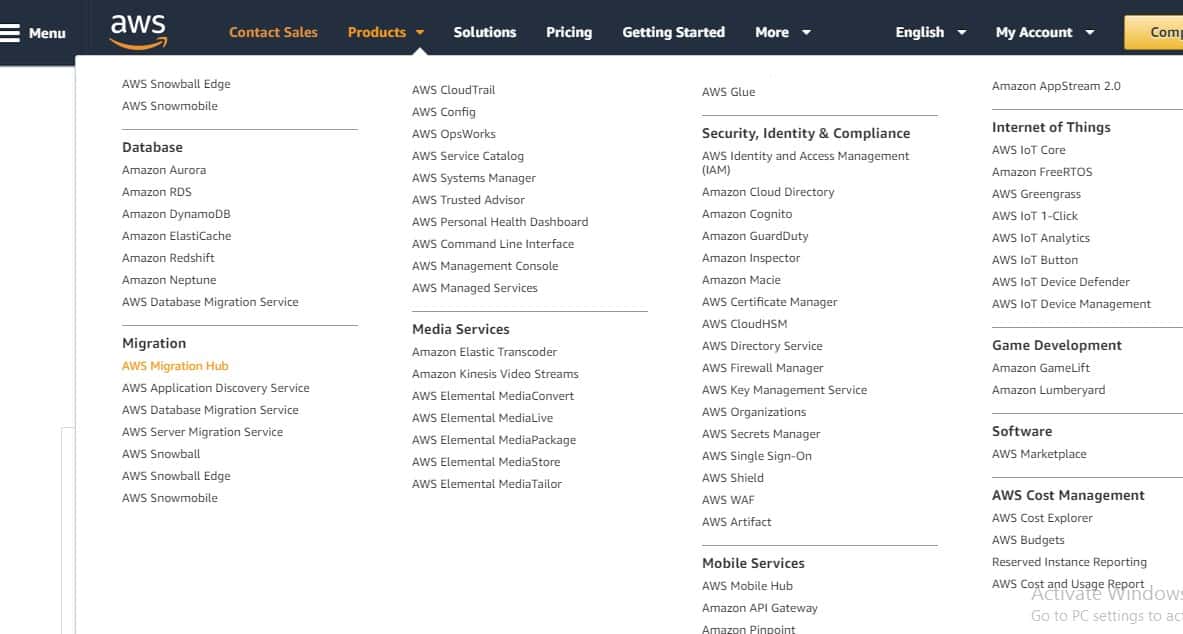
By doing so you will open an AWS Tools button where there are two different discovery tools. The first one is an AWS Discovery Connector and the second one is AWS Discovery Agent. The AWS Discovery connector is designed to work with the VMware vCenter so the Virtual Machine that you want to migrate exist in the VMware environment and if you are using the vCenter Server to manage the VMware host then AWS Discovery Connector is the best choice.
AWS Discovery Agent is AWS software that allows you to install the on-premises servers and the Virtual Machines for migration and discovery. It keeps track of the system performance, configuration, detail of the network connections and the running processes. The AWS Discovery Agent is available in Linux and Windows version.
AWS Discovery Agent is used when the Virtual Machine is not running on VMware or runs in the smaller environment that does not utilize the vCenter Server. If you want to migrate the workloads to the AWS Cloud from the physical servers then you can use the Discovery Agent. To get started you need to install the x86 version of the Microsoft Visual Studio C++ Redistributable before installing the agent. When you are installing the Microsoft Visual Studio C++ Redistributable you will notice that it references the 2015 version but the newer versions also work. If you are facing any new challenges with the installation then see whether the system is up to date.
After installing the Microsoft Visual Studio C++ Redistributable into the system you will then need to install the AWS Discovery Agent. It will be little difficult to install the Agent because of the agent consists of a standard setup wizard. If you just simply run the setup wizard the AWS Discovery Agent will get installed but it won’t function with the AWS account. So for this, you have to install the Discovery Agent from the Command line and specify the secret key and key ID.
Now the command syntax will be mentioned like this:
msiexec.exe /i AWSDiscoveryAgentInstaller.msi REGION="us-west-2" KEY_ID="<aws key id>" KEY_SECRET="<aws key secret>" /q
Once you have downloaded the agent and copied to the AWS Discovery Agent you can then run the command syntax. To check the agent is been installed or no you have to go to the control panels and go to programs and check if the AWS Discovery Agent is been installed or no. It will take some time for the AWS Discovery Agent to upload data to the AWS Console so in that meantime you can open the Service Control Manager and enter Services.msc and check if the AWS Discovery Updater and AWS Discovery Agent are installed and running in the background. Once this process is been completed you can then start working on the migration.
About Cloud.in:
Cloud.in is an AWS Advanced Consulting Partner that delivers AWS managed services that cater every business need and aims in simplifying the AWS Cloud Journey. Our Team is the driving force behind Cloud.in with the experience, knowledge, and the skills that they behold in making cloud computing and AWS Cloud a pleasant experience.
Subscribe to:
Comments (Atom)
How Well - Architected Is Your AWS Setup?
Cloud adoption is no longer the challenge. Cloud optimization is: Most organizations migrate to Amazon Web Services to gain agility, scal...
